Generating Configurations
Instead of writing PostgreSQL schemas, Elasticsearch mappings, and Arranger configs by hand, the Stage portal includes a Config Generator that produces all configuration files from your CSV data in one step.
Navigate to Config Generator in the Stage portal navigation bar (visible once Stage is running).
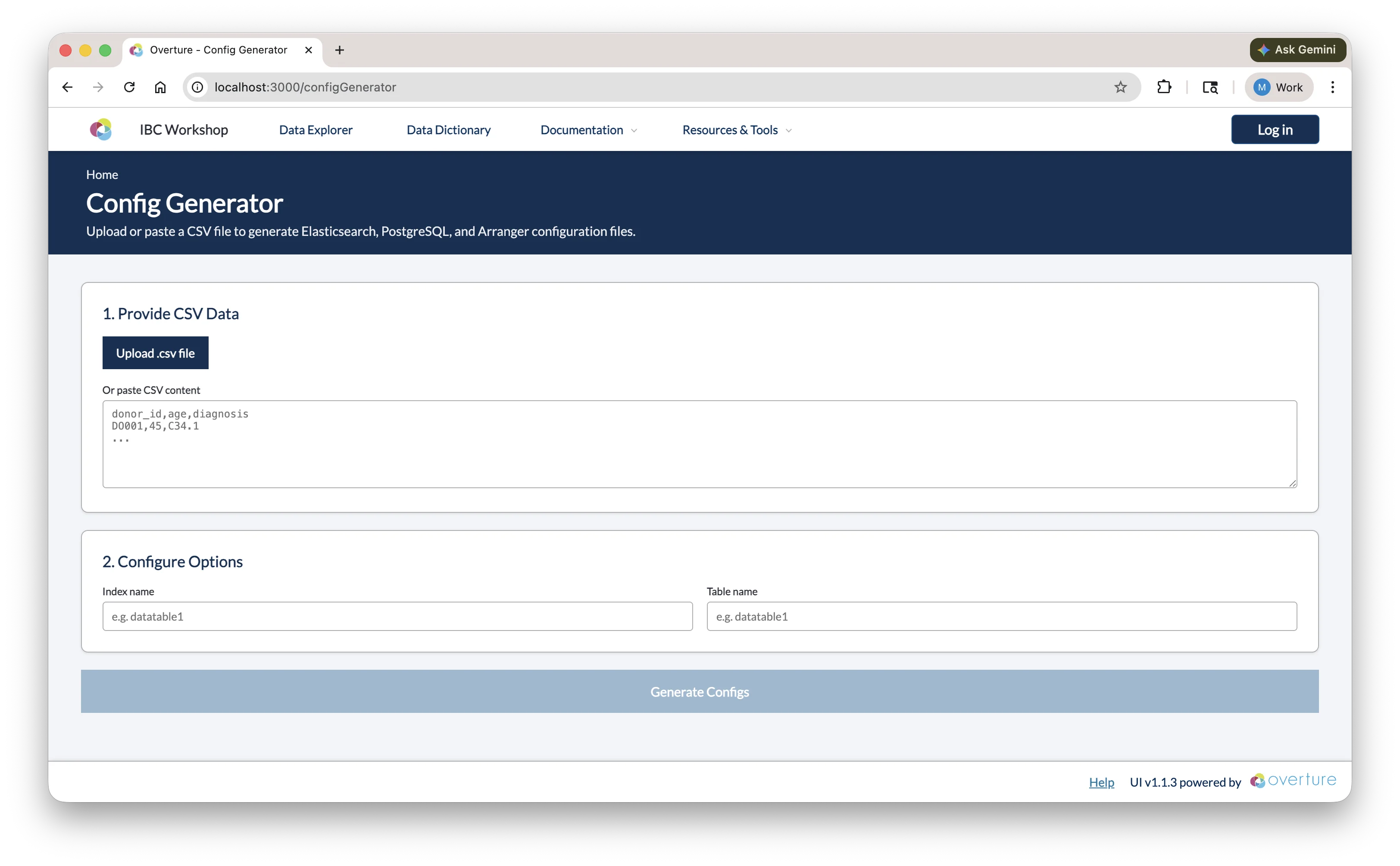
This same generator also runs in the docs, outside the workshop: Config Generators and Playgrounds produces the same files from a CSV entirely in your browser, with no running portal required.
Step 1: Provide CSV Data
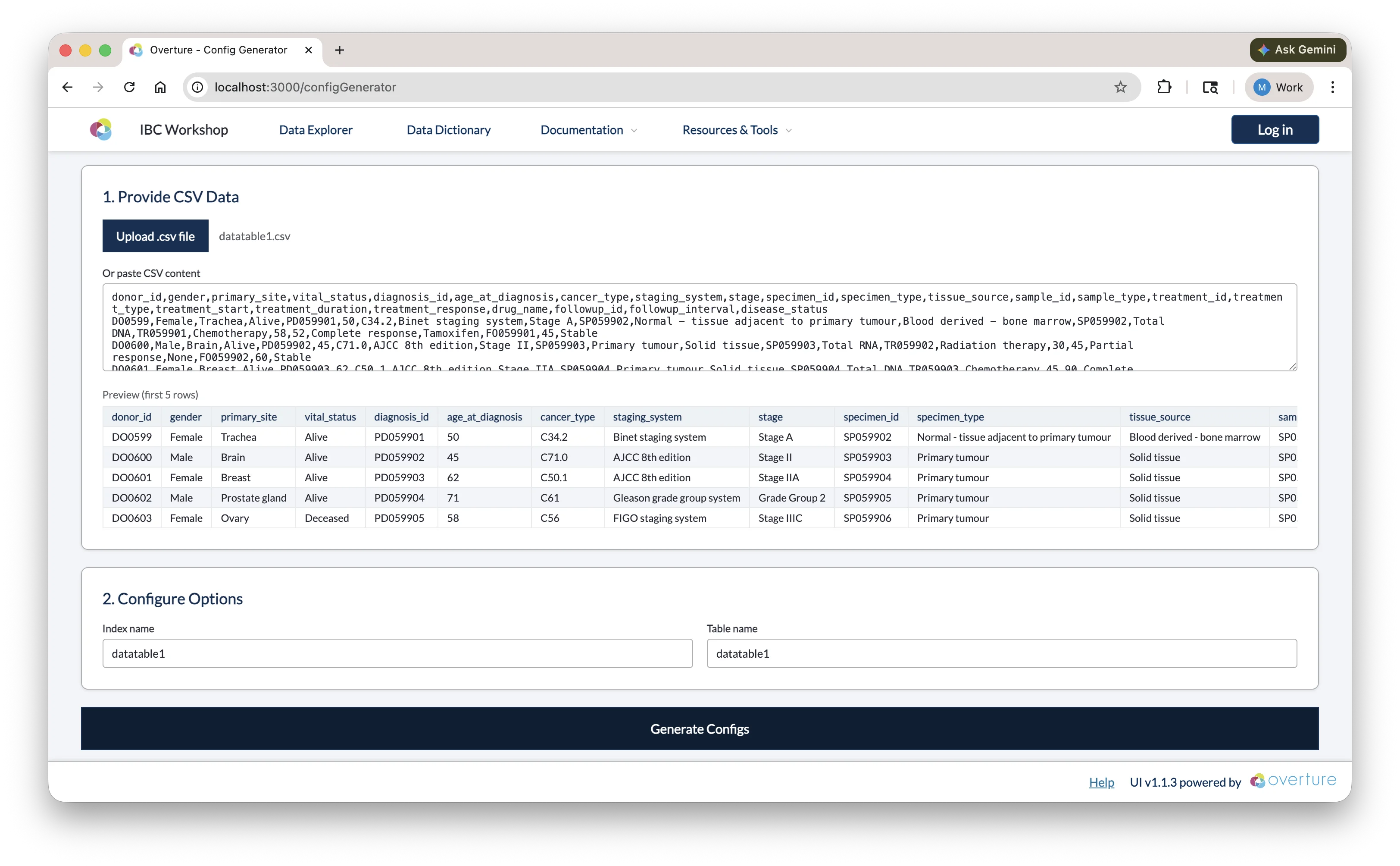
Upload a .csv file using the Upload .csv file button, or paste CSV content directly into the text area. Once loaded, a preview of the first five rows is shown so you can confirm the correct file was used.
Step 2: Configure Options
| Field | Description |
|---|---|
| Index name | The name of the Elasticsearch index. Auto-populated from the CSV filename; edit if needed (e.g. datatable1). |
| Table name | The name of the PostgreSQL table. Defaults to the same value as the index name. |
Step 3: Generate and Copy
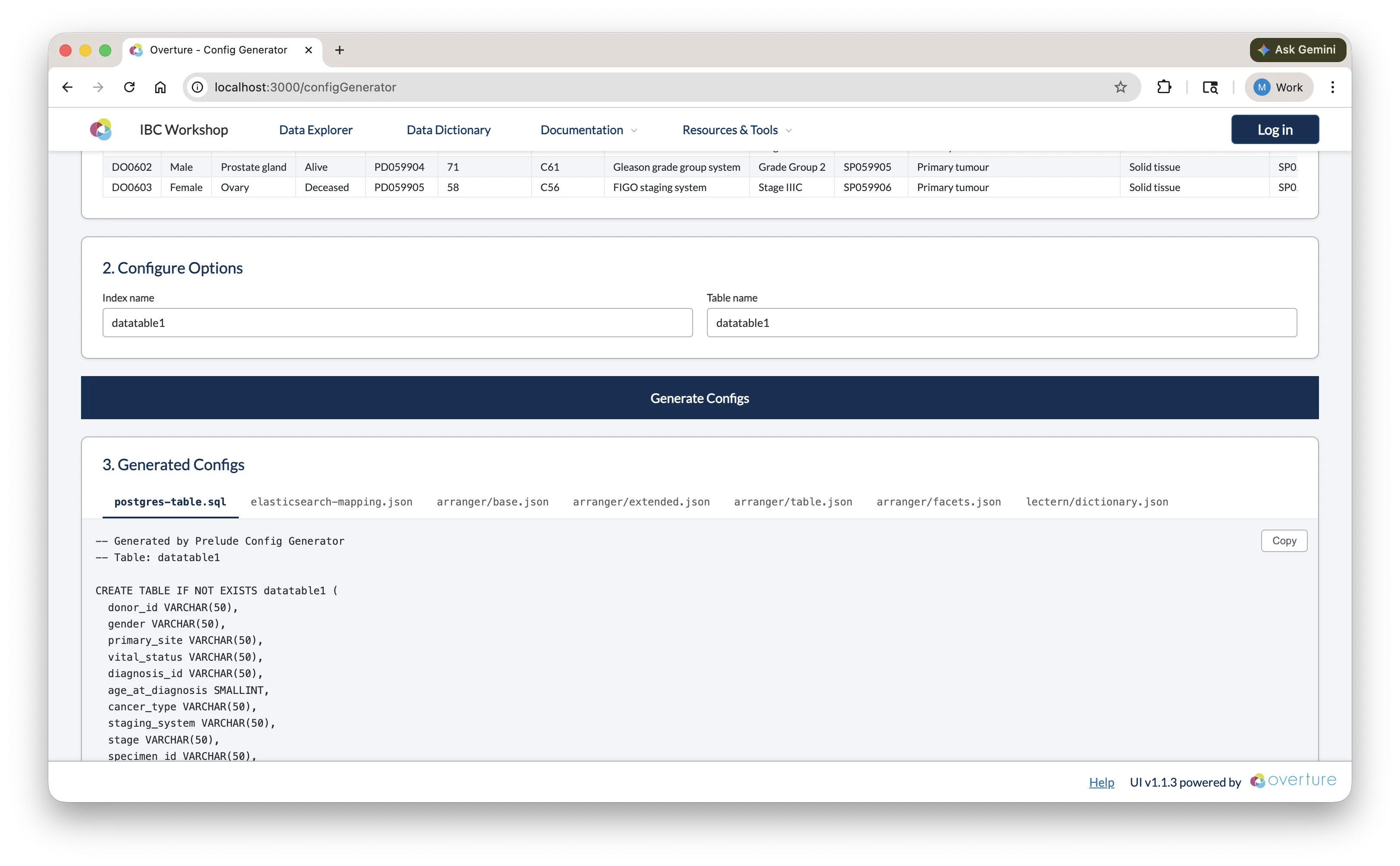
Click Generate Configs. Once complete, the output panel shows a tabbed view with seven files:
| Tab | File | Where to save |
|---|---|---|
postgres-table.sql | CREATE TABLE statement | setup/configs/postgresConfigs/ |
elasticsearch-mapping.json | Index template and field mappings | setup/configs/elasticsearchConfigs/ |
arranger/base.json | Arranger index and document type | setup/configs/arrangerConfigs/<indexName>/ |
arranger/extended.json | Human-readable field display names | setup/configs/arrangerConfigs/<indexName>/ |
arranger/table.json | Data table column configuration | setup/configs/arrangerConfigs/<indexName>/ |
arranger/facets.json | Sidebar filter configuration | setup/configs/arrangerConfigs/<indexName>/ |
lectern/dictionary.json | Lectern data dictionary | setup/configs/lecternDictionary/ |
Use the Copy button on each tab to copy the content, then paste it into the corresponding file in your project.
Reviewing the Output
The generated configs are a starting point; review each file before saving and adjust as needed:
Each generated file has a configuration guide that covers every option in detail:
- For
elasticsearch-mapping.json, see Index Mappings. - For the four
arranger/*.jsonfiles, see Customizing the Data Portal. - For
lectern/dictionary.json, see Building Dictionaries.
postgres-table.sql
The generator infers SQL column types from your data (e.g. VARCHAR for text, SMALLINT or INTEGER for numbers) and adds a submission_metadata JSONB column for tracking. You may want to:
- Increase
VARCHARlengths for columns with longer values - Change
SMALLINTtoINTEGERfor larger numeric ranges - Add constraints if needed (e.g.
NOT NULL)
Click here to see a breakdown of the generated SQL
-- PostgreSQL table creation script
-- Generated from CSV analysis
-- Table: datatable1
-- Columns: 24 (23 data + 1 submission_metadata)

CREATE TABLE IF NOT EXISTS datatable1 (
  donor_id VARCHAR(50),
  gender VARCHAR(50),
  primary_site VARCHAR(50),
  vital_status VARCHAR(50),
  diagnosis_id VARCHAR(50),
  age_at_diagnosis SMALLINT,
  cancer_type VARCHAR(50),
  staging_system VARCHAR(50),
  stage VARCHAR(50),
  specimen_id VARCHAR(50),
  specimen_type VARCHAR(63),
  tissue_source VARCHAR(50),
  sample_id VARCHAR(50),
  sample_type VARCHAR(50),
  treatment_id VARCHAR(50),
  treatment_type VARCHAR(50),
  treatment_start SMALLINT,
  treatment_duration SMALLINT,
  treatment_response VARCHAR(50),
  drug_name VARCHAR(50),
  followup_id VARCHAR(50),
  followup_interval SMALLINT,
  disease_status VARCHAR(50),
  submission_metadata JSONB
);

-- Unique index on submission_id within the JSONB metadata column.
-- Required by Conductor's ON CONFLICT deduplication: if a row with the same
-- submission_id is uploaded again, it is silently skipped instead of duplicated.
DROP INDEX IF EXISTS idx_datatable1_submission_id;
CREATE UNIQUE INDEX IF NOT EXISTS idx_datatable1_submission_id
ON datatable1 ((submission_metadata->>'submission_id'));
| Element | What it means |
|---|---|
VARCHAR(50) | A variable-length text field with a max of 50 characters. Increase this if any values in your column are longer, otherwise PostgreSQL will truncate or reject them on insert. |
SMALLINT | A 2-byte integer supporting values from −32,768 to 32,767. Change to INTEGER (up to ~2.1 billion) or BIGINT if your values can exceed that range. |
submission_metadata JSONB | A binary JSON column added by the generator and populated by Conductor with each record's tracking info: submission_id, source_file_hash, and processed_at. Do not remove; Conductor depends on it to ensure data is never duplicated. |
CREATE TABLE IF NOT EXISTS | PostgreSQL skips creation if the table already exists, so it's safe to re-run the script without accidentally dropping data. |
Unique index on submission_id | Enforces that each uploaded record has a unique submission ID. If Conductor encounters a duplicate during re-upload, it silently skips the row instead of inserting a duplicate or throwing an error. |
The setup service automatically discovers and executes all SQL files in setup/configs/postgresConfigs/ at startup. Ensure your generated SQL file is saved to this directory before launching the platform.
For a full reference on PostgreSQL data types and CREATE TABLE syntax, see the PostgreSQL documentation.
elasticsearch-mapping.json
Field types are inferred from your CSV data. Review and correct:
- Ensure numeric fields are typed as
integerorfloat, notkeyword - Ensure date fields are typed as
date - Categorical fields should remain
keyword
Click here to see a breakdown of the generated mapping
{
  "index_patterns": ["datatable1-*"],
  "aliases": {
    "datatable1_centric": {}
  },
  "mappings": {
    "properties": {
      "data": {
        "type": "object",
        "properties": {
          "donor_id": { "type": "keyword" },
          "gender": { "type": "keyword" },
          "primary_site": { "type": "keyword" },
          "vital_status": { "type": "keyword" },
          "diagnosis_id": { "type": "keyword" },
          "age_at_diagnosis": { "type": "integer" },
          "cancer_type": { "type": "keyword" },
          "staging_system": { "type": "keyword" },
          "stage": { "type": "keyword" },
          "specimen_id": { "type": "keyword" },
          "specimen_type": { "type": "keyword" },
          "tissue_source": { "type": "keyword" },
          "sample_id": { "type": "keyword" },
          "sample_type": { "type": "keyword" },
          "treatment_id": { "type": "keyword" },
          "treatment_type": { "type": "keyword" },
          "treatment_start": { "type": "integer" },
          "treatment_duration": { "type": "integer" },
          "treatment_response": { "type": "keyword" },
          "drug_name": { "type": "keyword" },
          "followup_id": { "type": "keyword" },
          "followup_interval": { "type": "integer" },
          "disease_status": { "type": "keyword" }
        }
      },
      "submission_metadata": {
        "type": "object",
        "properties": {
          "submission_id": { "type": "keyword", "null_value": "No Data" },
          "source_file_hash": { "type": "keyword", "null_value": "No Data" },
          "processed_at": { "type": "date" }
        }
      }
    }
  },
  "settings": {
    "number_of_shards": 1,
    "number_of_replicas": 0
  }
}
| Element | What it means |
|---|---|
index_patterns: ["datatable1-*"] | This template applies to any index whose name starts with datatable1-. Elasticsearch uses it automatically when a matching index is created. |
aliases: { datatable1_centric } | A stable reference name that Arranger queries. Even if you version your indices, the alias always points to the right one; do not change this without also updating base.json. |
data object | All your CSV columns are nested here. This separation keeps your data fields distinct from system metadata. |
keyword type | Exact-match text field, used for categorical values and faceted filtering. Cannot do range queries. |
integer type | Whole number field, supports range queries and numeric aggregations. |
submission_metadata object | Added by the generator, populated by Conductor. Contains submission_id, source_file_hash, and processed_at; do not remove. |
null_value: "No Data" | What Elasticsearch displays when a field has no value. Ensures missing data is visible in facets rather than silently absent. |
number_of_shards: 1 | Number of primary partitions. One is appropriate for local development; increase for multi-node production clusters. |
number_of_replicas: 0 | Number of copies of each shard. Zero is fine for local dev; set to 1+ in production for redundancy. |
Date fields can be problematic. Elasticsearch is strict about date formats; if your data contains dates in mixed formats or includes timezone offsets, indexing will fail. It's safest to normalise all date values to ISO 8601 format (YYYY-MM-DD or YYYY-MM-DDTHH:mm:ssZ). If you're unsure, leaving a date field as keyword will allow it to index without errors, though you'll lose date-range filtering.
For a full reference on Elasticsearch mapping types and settings, see the Elasticsearch mapping documentation.
arranger/base.json
Click here to see a breakdown of base.json
{
  "documentType": "records",
  "esIndex": "datatable1-index"
}
| Field | What it means |
|---|---|
documentType | Always set to "records" by the generator. |
esIndex | The Elasticsearch index or alias that Arranger queries. Must match the alias defined in your mapping (datatable1_centric). |
Update esIndex to match the alias from your Elasticsearch mapping (datatable1_centric), not the index name pattern (datatable1-*). Arranger queries through the alias so it always points to the correct index.
arranger/extended.json
Display names are auto-generated by converting snake_case to Title Case. Review and adjust any that don't read well; these are the labels shown to users in the portal UI.
Click here to see a breakdown of extended.json
{
  "extended": [
    {
      "displayName": "Donor Id",
      "fieldName": "data.donor_id"
    },
    {
      "displayName": "Age At Diagnosis",
      "fieldName": "data.age_at_diagnosis"
    },
    {
      "displayName": "Cancer Type",
      "fieldName": "data.cancer_type"
    }
  ]
}
| Field | What it means |
|---|---|
fieldName | The full dot-notation path to the field in Elasticsearch (e.g. data.donor_id). Must match the mapping exactly. |
displayName | The label shown to users in the portal UI for this field. Edit these freely; they have no effect on the underlying data. |
For a full reference on extended.json, see the Arranger extended configuration docs.
arranger/table.json
Consider hiding metadata columns (e.g. submission_metadata.*) by setting "show": false and "canChangeShow": false.
Click here to see a breakdown of table.json
{
  "table": {
    "rowIdFieldName": "submission_metadata.submission_id",
    "columns": [
      {
        "canChangeShow": true,
        "fieldName": "data.donor_id",
        "show": true,
        "sortable": true,
        "jsonPath": "$.data.donor_id",
        "query": "data { donor_id }"
      },
      {
        "canChangeShow": true,
        "fieldName": "data.cancer_type",
        "show": true,
        "sortable": true,
        "jsonPath": "$.data.cancer_type",
        "query": "data { cancer_type }"
      }
    ]
  }
}
| Field | What it means |
|---|---|
rowIdFieldName | The field used as a unique row identifier. Defaults to submission_metadata.submission_id; do not change. |
fieldName | Dot-notation path to the field in Elasticsearch. Must match the mapping. |
show | Whether the column is visible in the table by default. |
canChangeShow | Whether users can toggle this column's visibility using the column selector. |
sortable | Whether clicking the column header sorts the table. Disable for high-cardinality text fields. |
jsonPath | JSONPath expression used to extract the value from the response. Matches the field structure. |
query | The GraphQL sub-selection used to fetch this field. Must reflect the nested structure in your mapping. |
For a full reference on table.json, see the Arranger table configuration docs.
arranger/facets.json
Remove or deactivate facets that aren't useful for filtering, such as unique ID fields. Reorder entries to put the most important filters at the top.
Click here to see a breakdown of facets.json
{
  "facets": {
    "aggregations": [
      {
        "active": true,
        "fieldName": "data__gender",
        "show": true
      },
      {
        "active": true,
        "fieldName": "data__cancer_type",
        "show": true
      },
      {
        "active": false,
        "fieldName": "data__donor_id",
        "show": false
      }
    ]
  }
}
| Field | What it means |
|---|---|
fieldName | Double-underscore notation for the field path (e.g. data__cancer_type for data.cancer_type). This is specific to facets.json and differs from the dot-notation used in other config files. |
active | Whether the facet is enabled and will appear in the sidebar. |
show | Whether the facet is visible by default (can be used alongside active to pre-collapse a facet). |
For a full reference on facets.json, see the Arranger facet configuration docs.
Checkpoint
Before proceeding, confirm:
setup/configs/postgresConfigs/datatable1.sqlexists and contains a CREATE TABLE statement matching your CSV columnssetup/configs/elasticsearchConfigs/datatable1-mapping.jsonexists and contains field mappingssetup/configs/arrangerConfigs/datatable1/containsbase.json,extended.json,table.json, andfacets.jsonbase.jsonhas"esIndex": "datatable1_centric"(the alias, not the index name)- You've made at least one change to
facets.json(hidden a facet or reordered entries) setup/configs/lecternDictionary/datatable1.jsonexists (if using the Lectern data dictionary)
Next: We will learn how docker-compose.yml picks up these configuration files and wires them into the running services.